
Laptop vs Desktop: Which One Should You Buy in 2026?
Buying a new computer in 2026 can be confusing because there are so many options available. One of the biggest decisions buyers face is whether to choose a laptop or a desktop computer. Both devices are designed to perform similar tasks, such as browsing the internet, attending online meetings, editing documents, watching videos, programming, gaming, and creating content. However, each has its own strengths and limitations.
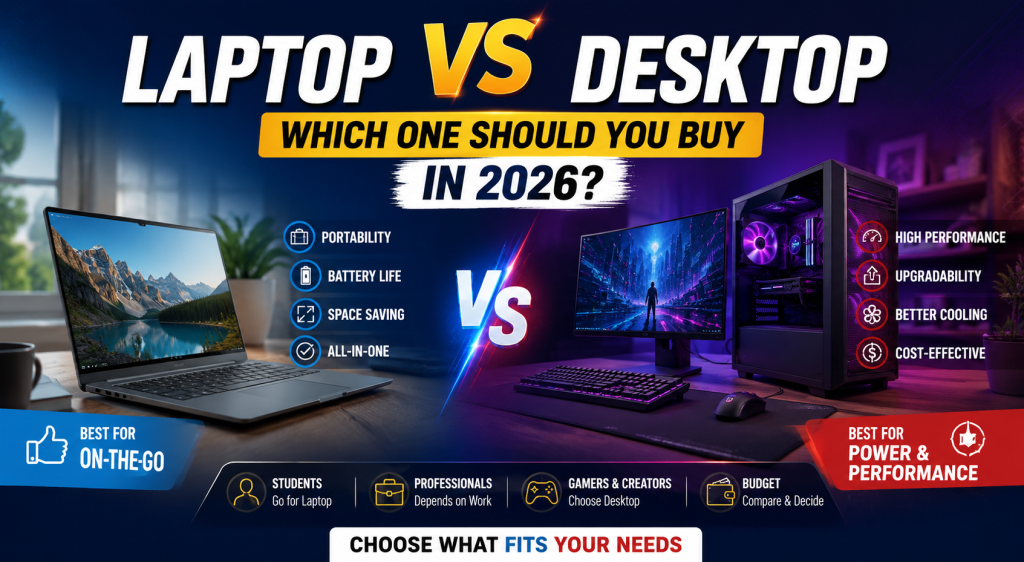
The right choice depends on your budget, work requirements, portability needs, and future upgrade plans. Some users need a lightweight device they can carry anywhere, while others need a powerful machine that can handle demanding software and heavy workloads. Understanding the differences between laptops and desktops will help you make an informed decision and avoid spending money on a device that doesn’t match your needs.
In this guide, we’ll compare laptops and desktops across five important factors, including performance, portability, upgrade options, pricing, and suitability for different users.
1. Performance Comparison
Performance is one of the most important factors when purchasing a computer. Although laptops and desktops can have similar specifications on paper, desktops generally deliver better performance.
Desktop computers have larger cabinets that provide better airflow and cooling systems. Because of this, desktop processors and graphics cards can run at higher speeds for longer periods without overheating. This makes desktops ideal for tasks like video editing, software development, 3D rendering, gaming, and handling large datasets.
Laptops, on the other hand, are designed to be compact and energy-efficient. Modern laptops have become incredibly powerful, especially premium models equipped with the latest Intel Core Ultra, AMD Ryzen AI, or Apple Silicon processors. They can comfortably handle office work, coding, online classes, graphic design, and even moderate video editing.
However, under continuous heavy workloads, laptops may reduce their processing speed to manage heat, a process known as thermal throttling. This means they may not maintain peak performance as consistently as desktops.
If maximum processing power is your priority, a desktop is usually the better investment. If you need a balance between performance and mobility, a laptop is an excellent choice.
2. Portability and Convenience
The biggest advantage of a laptop is its portability. Since it combines the screen, keyboard, touchpad, battery, speakers, and computer into one device, you can easily carry it wherever you go.
Students often prefer laptops because they can take them to college, libraries, or study groups. Professionals who work remotely or travel frequently also benefit from having a portable workstation that allows them to stay productive from almost anywhere.
Another advantage is that laptops come with built-in batteries, allowing you to continue working even during power cuts. This feature is especially useful in areas where electricity interruptions are common.
Desktop computers, in contrast, are stationary devices. They require a separate monitor, keyboard, mouse, and constant power supply. Once installed, moving a desktop setup is inconvenient and often impractical.
However, desktops offer larger monitors that improve productivity, especially for professionals working with spreadsheets, graphic design software, or multiple applications simultaneously. You can also connect multiple monitors more easily to create a more efficient workspace.
If your work requires frequent travel, portability should be your top priority, making a laptop the obvious choice. If you mainly work from one location, a desktop offers a more comfortable long-term setup.
3. Upgrade and Repair Options
One area where desktop computers clearly outperform laptops is upgradeability.
Most desktop components can be replaced or upgraded individually. If you need more RAM, additional storage, a faster graphics card, or a more powerful processor, you can upgrade only that specific component instead of buying a completely new computer.
This flexibility allows desktops to remain useful for many years. Instead of replacing the entire system every few years, you can gradually improve its performance with affordable upgrades.
Repairing desktop computers is also simpler and less expensive. Faulty components can usually be replaced individually, reducing maintenance costs.
Laptops have more limitations in this area. Many modern ultrabooks come with RAM and storage soldered directly onto the motherboard, making upgrades difficult or even impossible. Repairing laptops can also be more expensive because their compact internal design often requires specialized parts and labor.
Before purchasing a laptop, it’s important to check whether the RAM or SSD can be upgraded in the future. Buying a model with sufficient memory and storage from the beginning can help extend its lifespan.
If you want a computer that can evolve with your needs over time, desktops provide much greater flexibility.
4. Cost and Value for Money
Budget plays a significant role when choosing between a laptop and a desktop.
For the same price, a desktop generally offers better performance than a laptop. Since desktops don’t need compact components, batteries, or specialized cooling systems, manufacturers can include more powerful hardware at a lower cost.
For example, a desktop priced around ₹60,000 may deliver better gaming or editing performance than a laptop at the same price. This makes desktops a popular choice among gamers, designers, and professionals who need maximum power without exceeding their budget.
Laptops, however, provide additional value through portability and convenience. Even though they may cost more for similar performance, they eliminate the need to purchase a separate monitor, keyboard, webcam, speakers, and battery backup. Everything is built into a single device.
It’s also important to consider long-term expenses. Desktop users may eventually spend money on accessories such as monitors, UPS systems, speakers, or ergonomic furniture. Laptop users may need replacement batteries after several years of use.
Instead of comparing only the initial purchase price, evaluate the complete ownership cost and determine which option provides better value based on your lifestyle and work habits.
5. Which One Is Best for Different Users?
There is no single computer that is perfect for everyone. The ideal choice depends entirely on how you plan to use it.
Students usually benefit from laptops because they need portability for classes, assignments, presentations, and online learning.
Office professionals who travel frequently or work in hybrid environments should also choose laptops for their flexibility and convenience.
Software developers may prefer laptops if they work remotely, while desktop computers are excellent for those who have a dedicated workspace and require multiple monitors.
Graphic designers, video editors, and 3D artists often achieve better performance with desktop computers because these tasks require powerful processors, dedicated graphics cards, and efficient cooling systems.
Gamers generally receive better value from desktop computers due to higher frame rates, better graphics performance, and easier hardware upgrades. However, gaming laptops have improved significantly and are suitable for users who need portability.
Home users who mainly browse the internet, watch videos, manage documents, and attend video calls can comfortably choose either a laptop or a desktop based on personal preference and available space.
The best decision is the one that aligns with your daily routine rather than simply choosing the most expensive computer.
Conclusion
Both laptops and desktop computers continue to improve every year, making either option capable of handling most everyday tasks. The real difference lies in how and where you plan to use your computer.
Choose a laptop if you value portability, flexibility, and the ability to work from different locations. It is an excellent option for students, remote workers, freelancers, and business professionals.
Choose a desktop if your priority is maximum performance, easier upgrades, better cooling, and long-term value for money. It is ideal for gamers, designers, video editors, engineers, and users with a dedicated workspace.
Before making your purchase, consider your budget, future upgrade plans, software requirements, and work environment. Investing in the right computer today will provide better performance, productivity, and reliability for years to come.